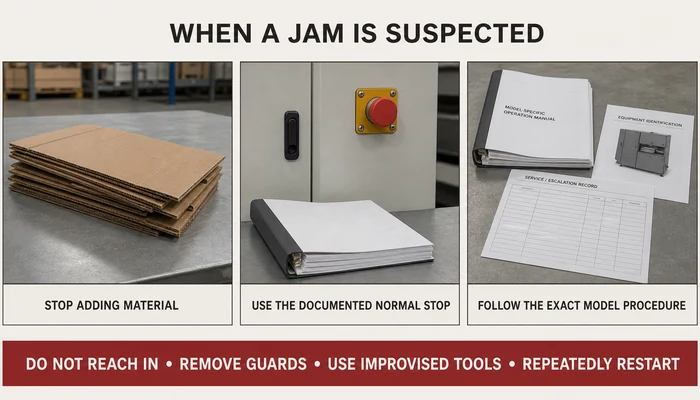
If a cardboard shredder stops feeding, changes sound, produces irregular output, or stops unexpectedly, stop adding material and use the documented normal-stop procedure. Do not reach into the feed opening, remove a guard, or improvise a jam-clearing method.
An operator can check external conditions such as the cardboard being fed, visible contamination, control indications, guard status, and whether the input matches the machine’s documented limits. Any task that requires access to the cutting area, removal of a guard, energy isolation, internal inspection, or component adjustment should be escalated according to the machine manual and the site’s safety procedure.
This guide helps packaging teams classify common symptoms, complete checks from the normal operating position, and collect useful information for maintenance or service support. It does not replace the exact machine manual, the employer’s safety program, or instructions from an authorized service provider.
Start With the Exact Manual and Site Procedure
A cardboard shredder model may define normal stopping, reversing, overload recovery, approved input, cleaning, and operator checks differently from another model. Use the current manual for the installed configuration and the employer’s site-specific procedure before responding to a stoppage.
Do not assume that pressing a stop button disconnects every hazardous energy source. If a task may expose a person to unexpected startup, stored energy, a cutting area, an ingoing nip point, or rotating components, the site must determine the required energy-control procedure and the personnel authorized to perform the work.
For U.S. general-industry workplaces, OSHA 1910.147 addresses hazardous-energy control during covered servicing and maintenance, while OSHA 1910.212 addresses machine guarding. Other jurisdictions and sectors may apply different requirements.
Classify the Symptom Before Assuming the Cause
Why Jams Happen More Often Than Expected
Repeated feeding problems can have several contributing factors, including material outside the documented input range, contamination, inconsistent preparation, feed orientation, duty-cycle mismatch, or a condition requiring technical service. Feeding more layers, thickness, or material than the exact model permits may increase resistance or trigger an overload condition. Uneven loading, especially feeding cardboard at an angle, can also cause the material to twist and bind between cutting rollers.
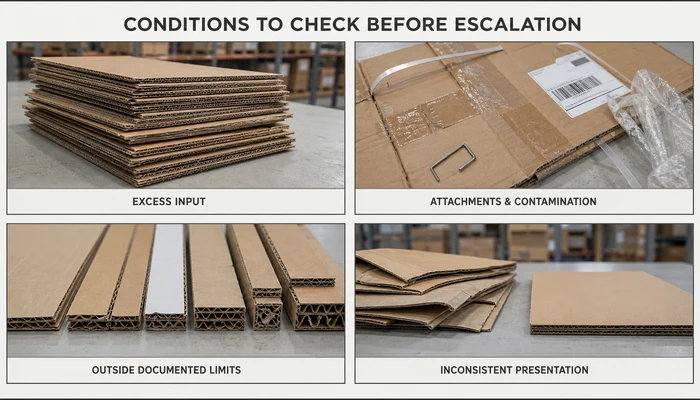
Another frequent issue is a mismatch between cardboard thickness and machine capacity. Even industrial cardboard shredders have defined limits for corrugated thickness. Material outside the documented limits should be diverted rather than used to test whether the machine can accept it.
Attachments and contaminants can affect feeding and cutting performance. Remove strapping, plastic film, metal fasteners, and other materials prohibited by the exact machine manual. Check tape, labels, coatings, and unfamiliar materials against the documented input requirements before processing.
A stoppage does not identify its own cause. Record the material, feed condition, control indication, sound, output change, operating duration, and whether the event has occurred before. These observations can help distinguish an input problem, a workflow mismatch, a recurring machine condition, or an issue that requires technical service.
Reduce Repeat Problems Through Input Control
Proper Cardboard Preparation Before Shredding
Effective troubleshooting starts before cardboard even enters the shredder. Remove strapping, plastic film, metal fasteners, and any other attachments prohibited by the machine manual. Check tape, labels, coatings, and unfamiliar materials against the documented input limits before processing.
Flattening cartons is equally important. Folded or partially collapsed boxes create uneven thickness, which can cause the shredder to grab material unevenly. If a carton does not fit the documented feed opening or approved preparation method, divert it or prepare it only through the site’s established process.
For detailed guidance on cardboard preparation, see our Cardboard Preparation Guide.
Feeding Techniques That Reduce Stress on the Machine
Use the feed direction, cardboard orientation, layer limit, thickness range, and operating pattern documented for the exact machine model. Do not assume that single-sheet feeding, batch feeding, or a particular feed position is suitable for every cardboard shredder.
Prepare and present the cardboard in the manner specified by the manufacturer. Do not force material into the inlet, exceed the documented input limits, bypass a guard, or use hands or tools to push cardboard farther into the cutting area.
Stop feeding if the machine sound changes unexpectedly, material stops moving normally, output becomes irregular, a control indication appears, or a guard or safety device is not in its expected state. Use only the normal controls and recovery actions described in the current manual; otherwise, stop the task and follow the site’s escalation procedure.
Cardboard construction, thickness, moisture, coatings, folds, tape, labels, and other attachments can affect feeding, cutting resistance, and output consistency. When a problem occurs repeatedly with one material source or cardboard type, compare that material with the documented input limits for the exact machine model.
Do not process wet, contaminated, waxed, laminated, unusually heavy, or unfamiliar board unless the machine instructions explicitly permit it. For a closer comparison of how strip-cut and mesh-cut cardboard differ after processing, use the separate output-types guide.
What to Do When a Cardboard Shredder Jam Is Suspected
A suspected jam should be treated as a stop-and-assess condition, not as an invitation to pull material from the machine. If cardboard stops moving, the machine sound changes, output becomes irregular, or a control indication appears, stop adding material and use the normal-stop procedure documented for the exact machine model.
Do not reach into the feed or discharge opening, remove a guard, use a screwdriver or another improvised tool, or repeatedly restart the machine in an attempt to force the material through.
Recognize the Warning Signs From the Normal Operating Position
Possible warning signs include material no longer moving as expected, a change in motor sound, irregular or torn output, unusual vibration, a control-panel indication, or repeated stopping.
These observations can indicate excess resistance, material outside the documented limits, visible contamination, an overload condition, or a machine issue requiring technical review. They do not identify the cause by themselves.
Record the cardboard construction, thickness, folds, attachments, feed condition, displayed indication, sound, vibration, output change, and when the condition began. This information can help the responsible person determine the next step without requiring the operator to enter the cutting area.
Use Only Manual-Approved Normal Controls
Some cardboard shredders include a reverse or recovery control, but its presence does not mean it can be used for every jam. Use a reverse function only when the current manual defines it as a normal operator action for the observed condition, the operator has been trained to use it, and all guards and safety devices remain in their expected state.
Do not use reverse as a substitute for an energy-control procedure. If the manual does not clearly authorize the recovery action, or if the material cannot be recovered while the operator remains outside the guarded danger area, stop the task and follow the site’s escalation procedure.
Stop and Escalate When Internal Access Is Required
Stop the task and notify the responsible person if any of the following conditions apply:
- Material cannot be recovered using a manual-approved normal control.
- A hand or tool would need to enter the feed opening, discharge opening, cutting area, or another danger zone.
- A guard, cover, interlock, control, warning, or safety device is not in its expected state.
- Clearing the condition would require guard removal, internal inspection, component adjustment, cleaning, or access to rollers or cutting parts.
- The machine produces repeated stops, unusual vibration, smoke, odor, heat, visible damage, or unfamiliar noise.
- The correct recovery procedure or the operator’s authority is unclear.
The exact machine manual and the employer’s site-specific procedure should determine whether hazardous-energy control is required and which trained, authorized person may perform the work.
For U.S. general-industry workplaces, OSHA 1910.147 addresses hazardous-energy control during covered servicing and maintenance, while OSHA 1910.212 addresses machine guarding. Other locations and sectors may apply different requirements.
Restart Only Through the Approved Procedure
A restart should occur only after the manual-defined recovery condition has been met, guards and safety devices are in their expected state, employees are clear of the machine, and the person responsible under the site procedure has authorized the next step.
After restart, process only approved material and observe the machine from the normal operating position. If the same symptom returns, stop again and escalate the recurring condition rather than repeating the recovery action.
Reducing Unplanned Downtime
Use the Exact Model’s Maintenance Requirements
A cardboard shredder should not be assigned a generic daily, weekly, or monthly maintenance schedule. Maintenance tasks and intervals vary by model, operating hours, material condition, contamination exposure, and site procedures. Build the maintenance register from the current instructions for the exact model, the supplier’s current service documentation, and the site’s approved procedures. For each task, record the interval or trigger, the authorized role, any required shutdown or energy-control condition, the required parts or tools, and the completion record.
Operators should perform only the external observations and housekeeping tasks explicitly assigned to them. Any inspection, cleaning, adjustment, or service that requires reaching into a feed or discharge opening, removing a guard, or approaching cutters, rollers, or drive components should be completed by authorized personnel under the site’s documented procedure.
If the current documentation does not specify a maintenance task or interval, do not create one from a generic checklist. Ask the supplier or authorized service provider to confirm the requirement in writing before adding it to the site maintenance register.
For a framework for organizing model-specific tasks, responsibilities, records, and escalation points, see our cardboard shredder maintenance schedule guide.
Operator Training: The Most Overlooked Factor
Operator training should be specific to the exact machine model and the site’s approved procedure. Operators should know the approved input range, documented feeding method, normal start and stop controls, observable warning signs, prohibited actions, and the point at which they must stop and escalate the problem.
A quick-reference guide may be placed near the normal operating position when it matches the current machine manual and site procedure. It should identify approved materials, normal controls, stop conditions, and the correct escalation contact. Training does not authorize an operator to remove guards, reach into machine openings, or perform maintenance and service tasks assigned to authorized personnel.
For a complete framework covering responsibilities, competence checks, refresher training, and training records, see our cardboard shredder operator training checklist.
Control Operating Conditions That Affect Performance
A downtime investigation should include the operating environment as well as the machine. Compare ventilation, required clearance, dust exposure, temperature, humidity, and other site conditions with the limits documented for the exact model. Record any deviation instead of assuming that the machine itself is defective.
Cardboard condition should also be checked. Wet, warped, heavily contaminated, or unusually constructed board should not be processed unless the current machine instructions explicitly permit it. Material storage and handling should therefore be included in the site’s troubleshooting records.
Keep the area around the machine clear and maintain any ventilation or service clearance specified in the machine documentation. Routine operator housekeeping should remain external and must not require removing guards or reaching into feed, discharge, cutting, or drive areas.
If the same symptom repeatedly appears under similar material or environmental conditions, record the condition, the control indication, the material being processed, and the operating context. Provide that information to the responsible supervisor, supplier, or authorized service provider rather than repeatedly restarting the machine or creating an undocumented maintenance task.
When Output Changes Require Cutter Service
Changes in output quality, machine sound, vibration, feed resistance, or stopping frequency can indicate an input problem, an operating-condition problem, or a cutter condition that requires technical service. These symptoms do not prove that a blade is dull, damaged, or misaligned.
From the normal operating position, the operator should record:
- The machine model and serial number
- The cardboard construction, thickness, folds, coatings, and attachments
- The displayed indication or fault message
- Changes in sound, vibration, feed movement, or output
- When the condition began and whether it has occurred before
- Whether the same symptom appears with other approved cardboard
Do not reach into an opening, remove a guard, clean internal cutting components, inspect blade edges, rotate or flip cutters, adjust alignment, or attempt blade replacement based on general troubleshooting advice.
Any internal inspection, cleaning, adjustment, cutter rotation, wear assessment, or replacement must follow the current service instructions for the exact machine model. The site procedure must also identify the authorized role and any required hazardous-energy-control measures.
If the symptom continues after approved material and normal operating conditions have been confirmed, stop using the machine and provide the recorded information to the responsible supervisor, supplier, or authorized service provider. Return the machine to service only through the approved site procedure.
Operator Troubleshooting and Escalation Matrix
Use only the checks allowed by the exact machine manual and site procedure. Do not reach into an opening, remove a guard, or perform internal inspection.
| Symptom | Operator action | Stop and escalate when |
|---|---|---|
| Feeding stops | Stop feeding; check input limits and display | No approved recovery; event repeats; internal access is needed |
| Output is irregular | Confirm approved material and feed method | Problem continues or occurs with noise or vibration |
| Noise or vibration changes | Use the documented normal stop | Condition persists, returns, or includes heat, odor, or damage |
| Overload indication appears | Stop feeding; follow the approved control response | Indication remains, returns, or requires internal work |
| Machine stops unexpectedly | Read the display; check guard status externally | Cause is unclear, safety status is abnormal, or stopping repeats |
Record the following before requesting service:
- Machine model and serial number
- Material type and thickness
- Displayed message
- Sound, vibration, or output change
- Event time and frequency
- Approved checks already completed
Do not diagnose or correct blade, bearing, fastener, alignment, or internal blockage problems from this table. These tasks require authorized service under the exact model procedure.
Restart only through the approved machine and site procedure.
When Repeated Stops May Indicate a Capacity Mismatch
Repeated stops do not automatically mean that a larger machine is required. First confirm that the cardboard, feed method, operating pattern, maintenance status, and site conditions match the requirements for the installed model.
If the problem continues under approved operating conditions, record:
- Cardboard type and thickness
- Peak material volume
- Operating hours
- Feed pattern
- Stop frequency
- Displayed messages
Use the cardboard shredder sizing guide to compare operating demand with documented machine limits.
For current models, output options, and specifications, review the SelectPack cardboard shredder range. Confirm the final configuration through material testing and current supplier documentation.
Conclusion
Cardboard shredder troubleshooting should begin with observable symptoms, approved operator checks, and the exact procedure for the installed model. Stop feeding when operation changes unexpectedly, remain outside guarded areas, and do not turn a stoppage into an undocumented internal repair task.
Record the material, displayed indication, sound, vibration, output change, and operating conditions. If the symptom continues with approved material and normal operating conditions, stop the machine through the documented procedure and escalate the issue to the responsible supervisor, supplier, or authorized service provider.
Related Resources
Cardboard Shredder Operator Training Checklist